Model Management
The Model Management page allows users to view and manage a list of supported models for fine-tuning or inference purposes. Models can be downloaded directly from Hugging Face repositories. Before using the feature, ensure that your device is connected to the internet, as model downloads require access to external servers.
Additionally, on the first download attempt, users will be prompted to provide an Access Token from Hugging Face. This token can be obtained by following Hugging Face's official guidelines for token generation.
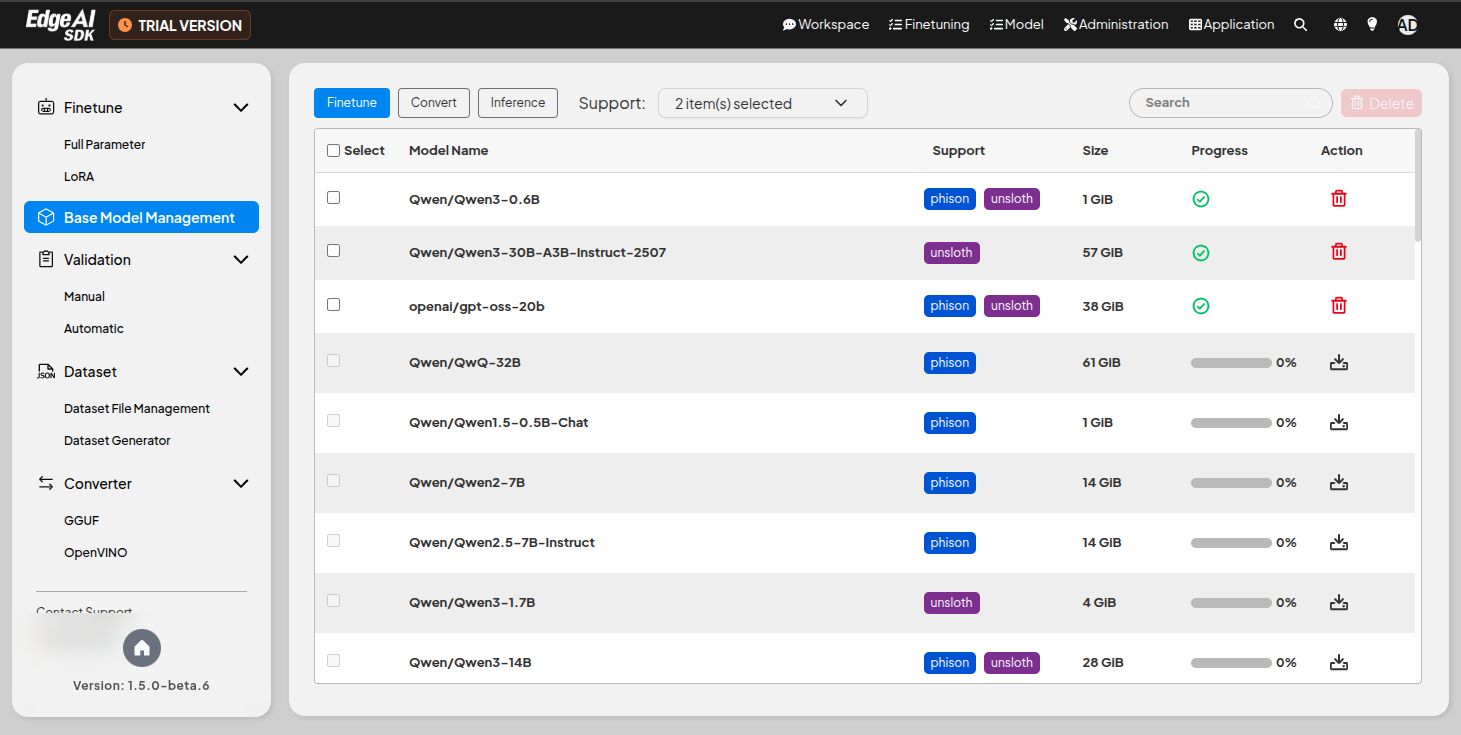
Features
- Function Selection:
- Select the function based on which the model list is filtered.
- Available options include
Finetun,Convert, andInference.
- Support:
- Select the support types to display for the models.
- Available support types vary depending on the selected function.
- Model List:
- Displays all available models, including their names, sizes, and current processing status.
- Users can search for specific models using the search bar.
- Model Details:
- Model Name: Specifies the name of the model (e.g.,
meta-llama/Llama-3.1-8B-Instruct). - Support: Use the
Phisontag for full parameters andUnslothfor the LoRA mechanism. A model tagged with both supports two different LLM fine-tuning approaches. - Size: Shows the storage size of each model (e.g., 29.93 GiB, 262.86 GiB).
- Process Status: Indicates whether the model is ready to use (✓ for ready).
- Action: Allows users to manage the model (e.g., download, delete).
- Model Name: Specifies the name of the model (e.g.,
- Download Process:
- Displays the download progress for models that are currently being fetched.
- Provides a clear indication of the model size and estimated time remaining.
- Supports
pauseandresumefunctionality for interrupted downloads.
- Access Token Requirement:
- During the initial download, users are required to provide a Hugging Face
Access Tokenfor authentication.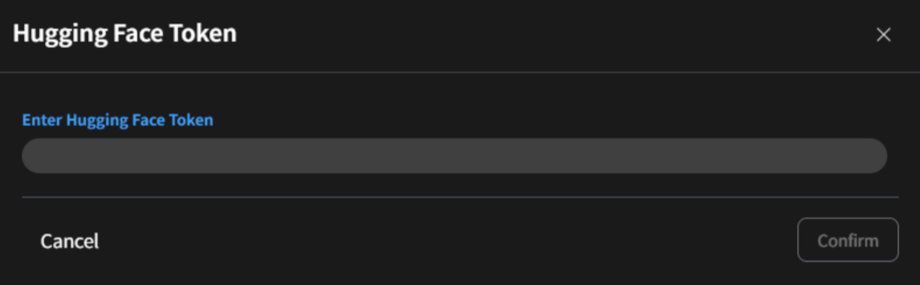
- For token generation, visit the Hugging Face website and follow the official instructions to create and retrieve your personal token.
- During the initial download, users are required to provide a Hugging Face
Supported Models
GenAI Studio filters the available models according to the hardware resources of the running host and each model's parameter size. Therefore, it is possible that the models displayed in the web page are fewer than those listed below.
- Full-Parameter Fine-Tuning (Phison Supported)
- LoRA Fine-Tuning (Unsloth Supported)
- Phison Inference (Phison Supported)
| Model Family | Model |
|---|---|
| Deepseek-ai | DeepSeek-R1-Distill-Llama-70B |
| DeepSeek-R1-Distill-Qwen-7B | |
| DeepSeek-R1-Distill-Qwen-32B | |
| gemma-2-9b-it | |
| gemma-3-1b-it | |
| Meta-llama | Llama-3.1-8B-Instruct |
| Llama-3.1-405B-Instruct | |
| Llama-3.2-3B-Instruct | |
| Llama-3.3-70B-Instruct | |
| Microsoft | phi-4 |
| Phi-4-reasoning | |
| Mistral | Mixtral-8x22B-Instruct-v0.1 |
| OpenAI | gpt-oss-20b |
| gpt-oss-120b | |
| Qwen | Qwen1.5-0.5B-Chat |
| Qwen2-7B | |
| Qwen2.5-7B-Instruct | |
| Qwen2.5-72B-Instruct | |
| Qwen3-0.6B | |
| Qwen3-14B | |
| Qwen3-32B | |
| QwQ-32B | |
| yentinglin | Llama-3-Taiwan-70B-Instruct |
| Model Family | Model |
|---|---|
| Deepseek-ai | DeepSeek-R1-0528-Qwen3-8B |
| DeepSeek-R1-Distill-Llama-8B | |
| DeepSeek-R1-Distill-Llama-70B | |
| DeepSeek-R1-Distill-Qwen-1.5B | |
| DeepSeek-R1-Distill-Qwen-7B | |
| DeepSeek-R1-Distill-Qwen-14B | |
| DeepSeek-R1-Distill-Qwen-32B | |
| gemma-4-E2B-it | |
| gemma-4-E4B-it | |
| gemma-4-26B-A4B-it | |
| gemma-4-31B-it | |
| Meta-llama | Llama-3.2-1B-Instruct |
| Llama-3.2-3B-Instruct | |
| Mistralai | Mistral-7B-Instruct-v0.3 |
| Mistral-Nemo-Instruct-2407 | |
| Mistral-Small-24B-Instruct-2501 | |
| Mistral-Small-Instruct-2409 | |
| NVIDIA | Llama-3.1-Nemotron-70B-Instruct-HF |
| OpenAI | gpt-oss-20b |
| gpt-oss-120b | |
| Qwen | Qwen3-0.6B |
| Qwen3-1.7B | |
| Qwen3-4B-Instruct-2507 | |
| Qwen3-8B | |
| Qwen3-14B | |
| Qwen3-30B-A3B | |
| Qwen3-30B-A3B-Instruct-2507 | |
| Qwen3-32B | |
| Qwen3.5-0.8B | |
| Qwen3.5-2B | |
| Qwen3.5-4B | |
| Qwen3.5-9B | |
| Qwen3.5-27B | |
| Qwen3.5-35B-A3B | |
| Qwen3.6-27B | |
| Qwen3.6-35B-A3B | |
| Qwen3-Coder-30B-A3B-Instruct |
| Model Family | Model |
|---|---|
| Deepseek-ai | DeepSeek-R1-Distill-Llama-70B |
| DeepSeek-R1-Distill-Qwen-1.5B | |
| DeepSeek-R1-Distill-Qwen-32B | |
| gemma-3-1b-it | |
| gemma-3-4b-it | |
| gemma-3-12b-it | |
| gemma-3-27b-it | |
| Microsoft | Phi-4-mini-instruct |
| Phi-4-multimodal-instruct | |
| Meta-llama | Llama-3.2-1B-Instruct |
| Llama-3.2-3B-Instruct | |
| Llama-3.3-70B-Instruct | |
| Meta-Llama-3.1-8B-Instruct | |
| Meta-Llama-3.1-70B-Instruct | |
| OpenAI | gpt-oss-20b |
| gpt-oss-120b | |
| OpenGVLab | InternVL3-38B |
| Qwen | Qwen2.5-0.5B-Instruct |
| Qwen2.5-1.5B-Instruct | |
| Qwen2.5-3B-Instruct | |
| Qwen2.5-7B-Instruct | |
| Qwen2.5-14B-Instruct | |
| Qwen2.5-32B-Instruct | |
| Qwen2.5-72B-Instruct | |
| Qwen2.5-VL-3B-Instruct | |
| Qwen2.5-VL-7B-Instruct | |
| Qwen2.5-VL-32B-Instruct | |
| Qwen2.5-VL-72B-Instruct | |
| Qwen3-0.6B | |
| Qwen3-1.7B | |
| Qwen3-4B | |
| Qwen3-14B | |
| Qwen3-32B | |
| QwQ-32B | |
| Taide | Llama-3.1-70B-Taiwan-Instruct |
Steps for Access Token
- Navigate to the Hugging Face website: https://huggingface.co.
- Log in to your Hugging Face account.
- Go to your account settings and select the Access Tokens tab.
- Generate a new token with the required permissions.
- Copy the token and provide it when prompted during the model download process in the application.
For more details, refer to the Hugging Face documentation.
Some models, such as LLAMA, require user consent for sharing contact information before download.