Dataset Management
Effective dataset preparation is crucial for successful fine-tuning of machine learning models. High-quality and well-structured datasets ensure that the models can learn accurately and generalize effectively. To support this, our system provides two flexible methods for managing datasets, catering to both advanced users who prefer manual preparation and those who seek automated solutions.
The Dataset Management feature provides two methods for handling datasets:
Method 1: Uploading Pre-Processed Dataset JSON/JSONL Files
Users can prepare their own Dataset JSON files in the specified format and upload them. The example format is as follows:
- QA Format
- Harmony Format
- ChatML Format
- The entire QA document is a JSON array, beginning with
[and ending with](lines 1,10). - Each element in the JSON array must be a JSON object, beginning with
{and ending with}(lines 2,5 and 6,9). - Each JSON object must contain two key-value pairs:
instructandoutput(lines 3,4 and 7,8).instructcontains the question or instruction, whileoutputcontains the corresponding response.
[
  {
    "instruct": "What processor is integrated into the AIR-100 system?",
    "output": "The AIR-100 system is integrated with an Intel Atom Processor E3950."
  },
  {
    "instruct": "What graphics engine is used for HDMI-1 and HDMI-2 outputs in the AIR-100?",
    "output": "The graphics engine used for HDMI-1 and HDMI-2 outputs in the AIR-100 is the NVIDIA GeForce GT 1030."
  }
]
- The entire Harmony document is a JSON array, beginning with
[and ending with](lines 1,36). - Each element in the JSON array must be a JSON object, beginning with
{and ending with}(lines 2,13 and 14,35). Each JSON object must contain exactly one key-value pair:messages(lines 3,15). - The value of
messagesmust be a JSON array. Each element in this array must be a JSON object containing the required key-value pairsrole(lines 5,9,17,21,25,30) andcontent(lines 6,10,18,22,27,32), along with an optionalchannel(lines 26,31).role: The value must be one ofsystem(line 17),user(lines 5,21), orassistant(lines 9,25,30). Thesystemmay appear only as the first element in themessagesarray (line 17).content: The corresponding message content. If the value issystem, it represents the system prompt (line 18). If it isuser, it represents the user's question or input (lines 6,22). If it isassistant, it represents the response to the corresponding user message (line 10).channel: This field may be present only whenroleisassistant. Its value must be one ofanalysis(line 26),commentary, orfinal(line 31). In these cases, the corresponding content represents the model's reasoning (line 27), commentary or annotations, and the final response (line 32), respectively.
[
  {
    "messages": [
      {
        "role": "user",
        "content": "What processor is integrated into the AIR-100 system?"
      },
      {
        "role": "assistant",
        "content": "The AIR-100 system is integrated with an Intel Atom Processor E3950."
      }
    ]
  },
  {
    "messages": [
      {
        "role": "system",
        "content": "You are an assistant with advanced reasoning capabilities."
      },
      {
        "role": "user",
        "content": "Prove why the square root of 2 is irrational."
      },
      {
        "role": "assistant",
        "channel": "analysis",
        "content": "I need to prove that sqrt(2) is irrational. I will use proof by contradiction.\nAssume sqrt(2) is rational, meaning it can be written as p/q where p and q are coprime integers, and q != 0.\nThen 2 = p^2 / q^2 => p^2 = 2q^2. This implies p^2 is even, so p must be even.\nLet p = 2k. Then (2k)^2 = 2q^2 => 4k^2 = 2q^2 => q^2 = 2k^2. This implies q^2 is even, so q must be even.\nIf both p and q are even, they share a common factor of 2, which contradicts the assumption that they are coprime.\nTherefore, the assumption is false, and sqrt(2) is irrational."
      },
      {
        "role": "assistant",
        "channel": "final",
        "content": "We can prove that $\\sqrt{2}$ is irrational using a proof by contradiction:\n\n1. **Assumption**: Suppose $\\sqrt{2}$ is a rational number. This means it can be written as a fraction $\\frac{p}{q}$, where $p$ and $q$ are coprime integers (they share no common factors other than 1) and $q \\neq 0$.\n2. **Squaring both sides**: $2 = \\frac{p^2}{q^2} \\implies p^2 = 2q^2$. This shows that $p^2$ is an even number, which means $p$ itself must also be an even number.\n3. **Substitution**: Since $p$ is even, we can write $p = 2k$ for some integer $k$. Substituting this back gives: $(2k)^2 = 2q^2 \\implies 4k^2 = 2q^2 \\implies q^2 = 2k^2$. This means $q^2$ is also an even number, so $q$ must be even as well.\n4. **Contradiction**: If both $p$ and $q$ are even, they both have 2 as a common factor. This directly contradicts our initial assumption that $p$ and $q$ are coprime.\n\nSince the assumption leads to a contradiction, it must be false. Therefore, $\\sqrt{2}$ is irrational."
      }
    ]
  }
]
- The entire ChatML document uses the JSONL format, where each line must contain a single JSON object.
- Each JSON object must contain exactly one key-value pair:
messages. - Each
messagesvalue must be a JSON array. Every element in the array must be a JSON object containing the required key-value pairsroleandcontent.role: The value must be one ofsystem,user, orassistant. Thesystemmay appear only as the first element in themessagesarray.content: The corresponding message content. If the value issystem, content represents the system prompt. If it isuser, it represents the user's question or input. If it isassistant, it represents the response to the corresponding user message.
{"messages": [{"role": "user", "content": "What processor is integrated into the AIR-100 system?"}, {"role": "assistant", "content": "The AIR-100 system is integrated with an Intel Atom Processor E3950."}]}
{"messages": [{"role": "user", "content": "What graphics engine is used for HDMI-1 and HDMI-2 outputs in the AIR-100?"}, {"role": "assistant", "content": "The graphics engine used for HDMI-1 and HDMI-2 outputs in the AIR-100 is the NVIDIA GeForce GT 1030."}]}
{"messages": [{"role": "user", "content": "How many HDMI outputs does the AIR-100 support, and what are their versions?"}, {"role": "assistant", "content": "The AIR-100 supports 4 HDMI outputs, with 2 HDMI 1.4 outputs and 2 HDMI 2.0 outputs."}]}```
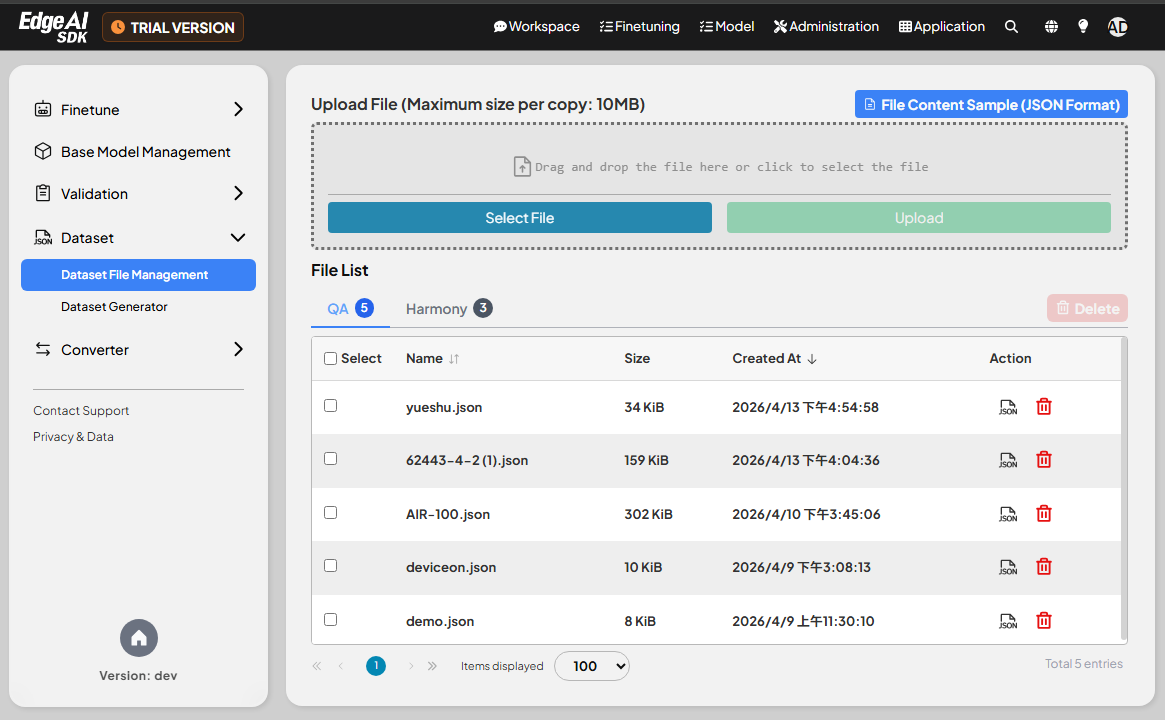
- Uploaded JSON/JSONL files must follow this format and should not exceed 10 MB in size.
- Once uploaded, the files will be listed in the Dataset List, showing the file name and size.
- Users can delete any uploaded files.
Method 2: Automatically Generating Datasets via the Dataset Generator
Currently, GenAI Studio dataset generator can only be used with QA format datasets; a dataset generator for Harmony format datasets will be added in a future version.
Users can upload PDF(.pdf), Word (.docx), plain text (.txt), or Excel (.xlsx) documents, and the system will automatically generate a specified number of datasets from these files.
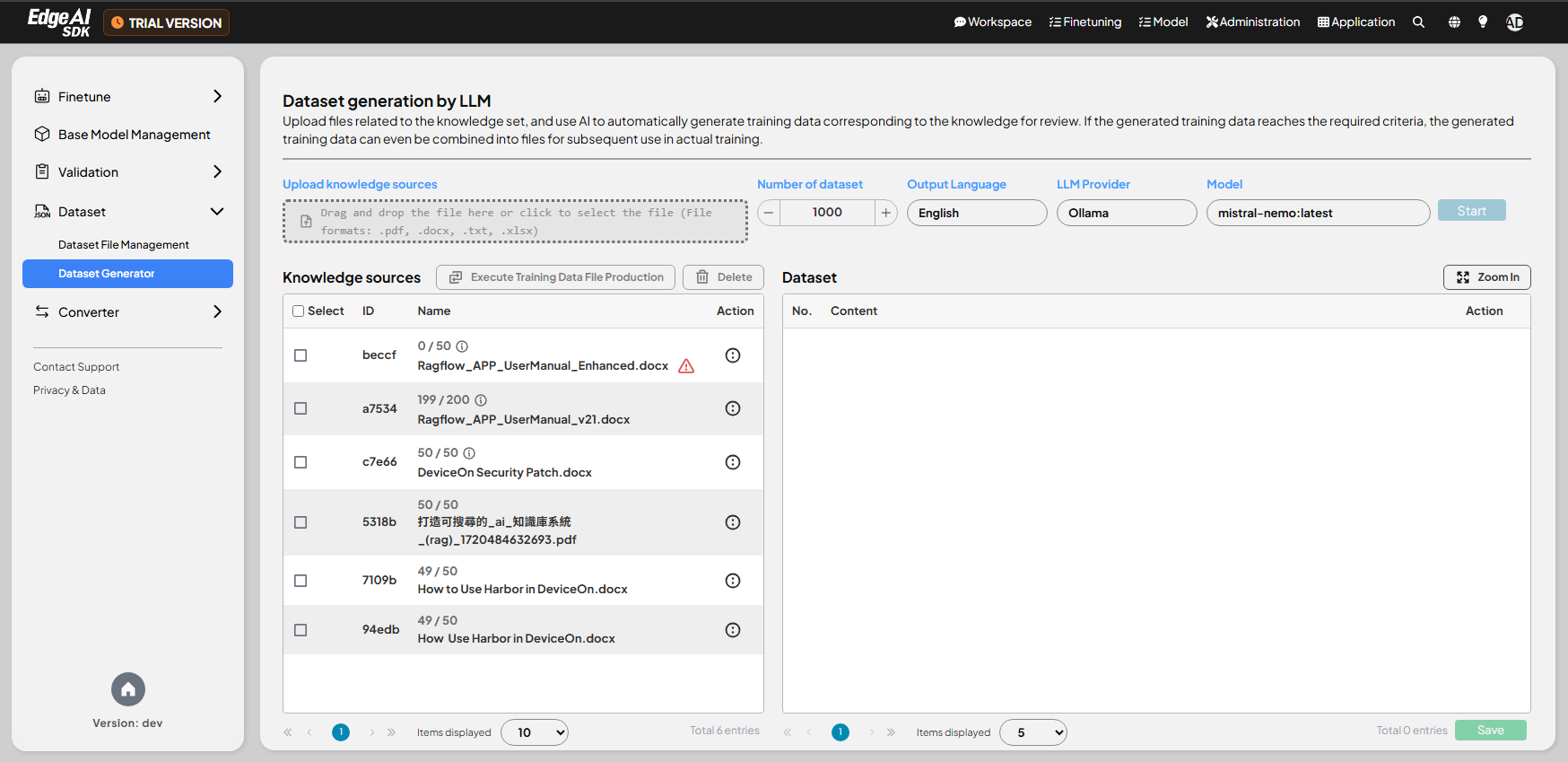
- Uploaded files must not exceed 10 MB in size.
- Users need to specify the number of datasets to be generated and click
Startto initiate the process. - If the data in the file is insufficient, the message The amount of dataset is too small may appear.
- Uploaded documents will be displayed in the Document List, where each entry can be edited or deleted.
- The system will show the generation progress and status, such as Stopped by user or Completed.
- Users can click on individual entries in the
Document Listto view the detailed contents of the generated datasets and edit them in real time.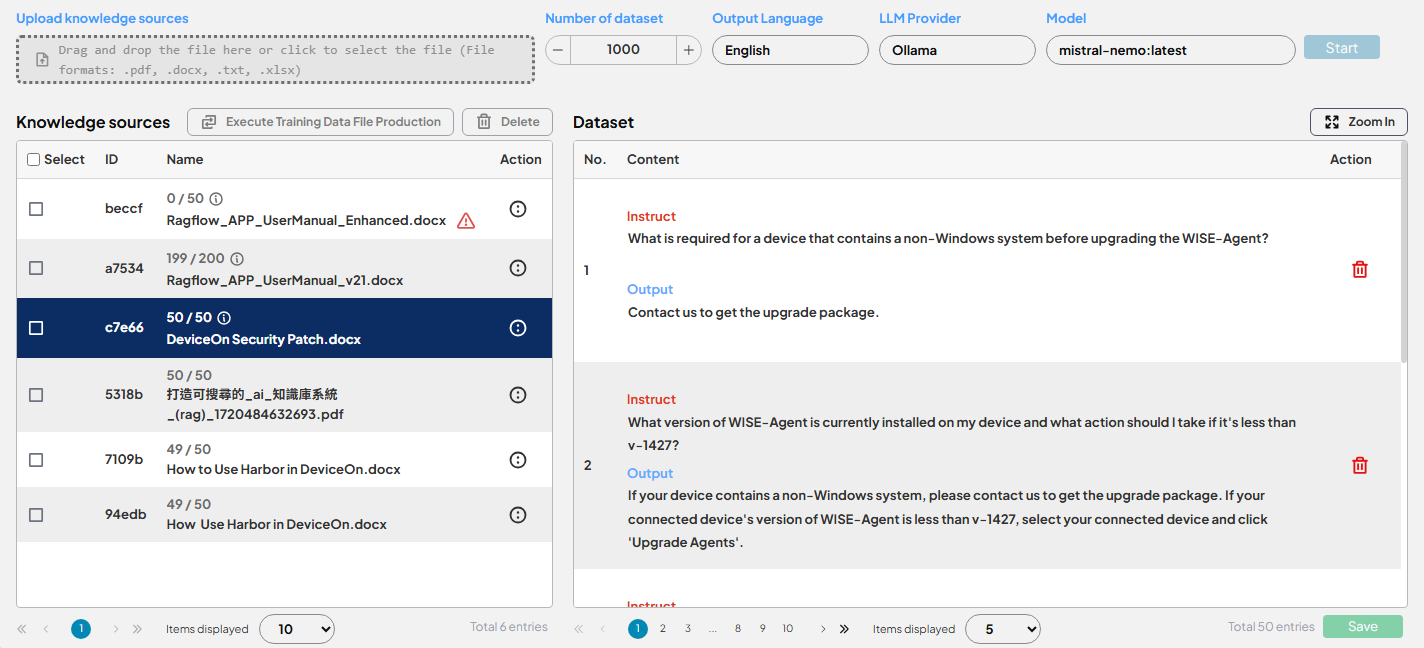
- Clicking
Generate dataset filesallows users to select multiple documents and combine them into a single JSON file, which can be used for subsequent fine-tuning.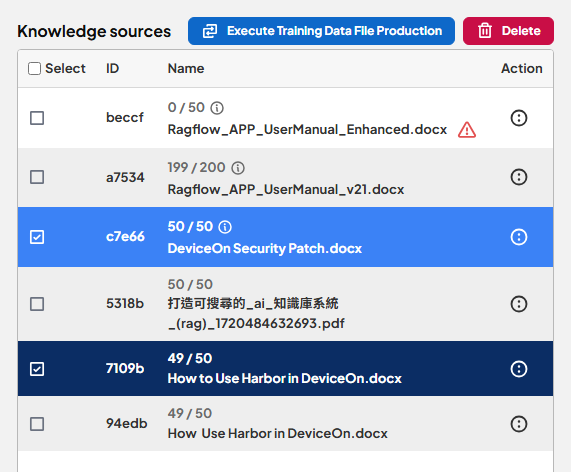
These two methods provide flexibility for users, whether they prefer to upload fully prepared JSON files or use the system's tools for quick dataset generation, catering to different needs.